See it before
you print it.
STLAR drops any STL or 3MF onto your desk at true printed size, straight through your phone's camera. No slicing. No guessing. No four-hour print that turns out 3 mm too wide.
Free Android app · Also available as a direct APK
Need the APK? Download STLAR-1.0.20.apkNow on Google Play. Beta feedback still genuinely shapes 1.0 - testers who report real issues get credited.
Try it right here
Try it right here.
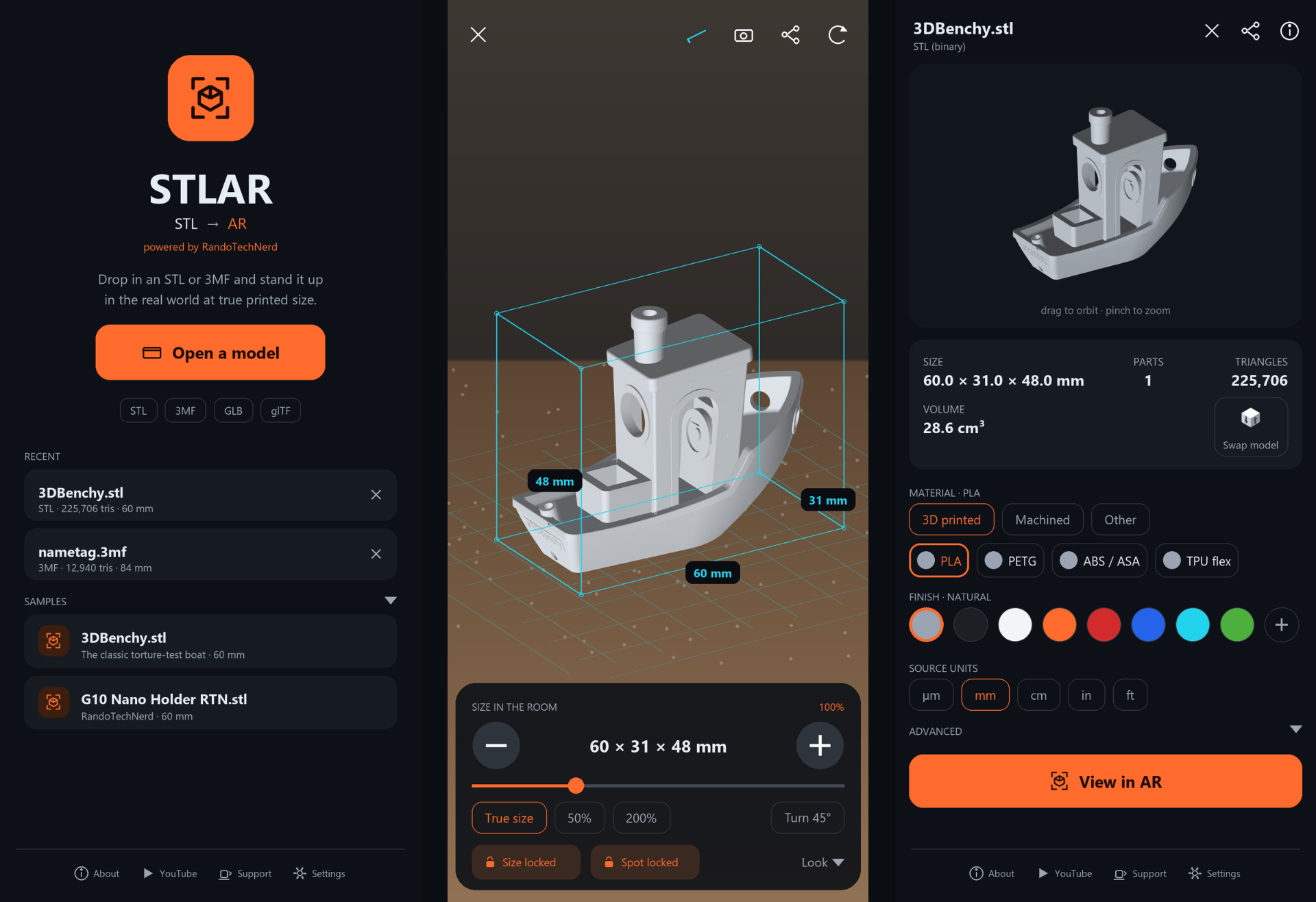
This is the real app's interface. Pick a material, choose a finish, resize it, turn it - the numbers update exactly like they do on your phone.
3D viewer — tap a material, then a finish
AR — scroll to resize, or use the controls
Web demo. App is much more awesome.
The problem
You've done this before.
You find a model. It looks about right. You slice it, print it, come back four hours later - and the bracket doesn't clear the rail, the case is a hair too tall, the handle is comically huge.
Rulers don't help. Slicer previews don't help. Your brain is bad at millimetres.
So put the thing in the room and look at it.
How it works
Three taps to true scale.
Open your file
STL, 3MF, GLB or glTF. Straight from Downloads, Drive, or the share sheet in your slicer.
Check the numbers
Exact bounding box in mm, volume in cm³, triangle count, part count - the same figures your slicer would quote.
Stand it up in the real world
Tap a surface. It lands at 1:1. Walk around it, crouch down, hold your hand next to it. Then decide whether to burn the filament.
What it does
Built by a maker, for makers.
True printed size, not “about that big”
A 60 mm Benchy shows up 60 mm tall. Every unit conversion happens once, precisely - what's on your table is what comes off the bed.
Measure it where it has to fit
A live wireframe box wraps the model with width, height, and depth in mm, updating as you scale.
15 materials, honest finishes
PLA, PETG, ABS/ASA, TPU, Nylon, Resin, PEEK, CF - plus Aluminium, Steel, Titanium, Brass, Copper, Clay, Acrylic. Real roughness & metallic shimmer.
Multicolour 3MF that stays multicolour
Reads color from the 3MF spec, Bambu/Orca projects, and PrusaSlicer volume data - parts stay separate.
Everything happens on your phone
No upload. No account. No server. Works in a workshop with no signal - or a factory that won't let files leave.
Share the shot
Capture the AR view - model, measurements and all - and send it straight to a customer or your group chat.
Install
How to install the beta.
STLAR is live on Google Play. One tap, no side-loading, no warnings. The direct APK is still here if you need it.
SHA-256: 5b626d2bfa1d83f8...7e7f3c4a04a8c0177b9e5c4785b6cbbc3976a9abf987d654
- 1Get it on Google Play
Tap the button, then Install.
- 2Open STLAR
Tap Open a model, or try one of the bundled samples.
- 3Direct APK option
If you need the APK, use the small link above. You may need to allow installs from your browser and tap Install anyway in Play Protect.
Beta notice - the honest version
This is a beta. Here's what you're signing up for.
- Device variation is the big unknown.
Android AR behaves differently across manufacturers. It may track beautifully on your phone and struggle on your friend's.
- Expect rough edges.
Some things may misbehave, or fail on files with unusual structure. Very large models (millions of triangles) will be slow and memory hungry.
- Some features are experimental.
Simulated print layer lines, in particular, are switched off by default - for play, not to rely on.
- Measurements are a design aid.
Accurate to your file's geometry, but AR placement depends on your device's tracking. Don't machine to them without checking.
- Updates will come often.
Settings may reset between builds while the beta stabilizes.
What it will not do: upload your files, collect your models, or ask for an account. Conversion is entirely on-device, and STLAR makes no network requests of its own.
The app asks for camera access, used only for the AR view. You'll also see an internet permission in the Play listing - that comes from the 3D rendering library STLAR is built on (it can fetch models from a URL; STLAR never does). No STLAR code opens a network connection. The only links that leave the app are the ones you tap yourself, which open in your browser.
Feedback
Tell me what breaks. Seriously.
The single most useful thing you can do right now is install it, try your own weirdest model, and tell me what happened. Good or bad. Every report shapes what gets fixed first - beta testers who send real feedback get credited when this hits 1.0.
Partner / White label
Want this in your own brand?
STLAR is available for partnership, licensing, and white-label deployment. If you sell printers, filament, resin, or parts - or you run a print farm, design service, or marketplace - a true-scale AR preview under your own logo closes sales photos can't.
- Your branding throughout - icon, colors, splash
- Your catalogue shipped as in-app samples
- Deep links from your store to life-size AR
- Custom material & finish libraries
- No-watermark commercial builds
- Bespoke feature work for your workflow
FAQ
Straight answers.
Yes - the core app is free. The free version adds a small STLAR watermark to AR photos you share, and that's the only difference.
That said, building, testing, and keeping STLAR working on new Android devices takes real time and real costs. If you want to help:
- Like a demo video on YouTube
- Buy me a coffee
- Grab the Pro version on Google Play when it launches
Anyone who buys me a coffee at any price will get Pro access - or another way to remove the watermark - as a direct thank-you. Heads up: Google Play takes a 30% cut on Pro purchases, so a coffee is the fastest way to support the project itself.